Core concepts in five minutes
This page leaves out APIs and options and covers only how IOSignal works. Each section links to the full page at the end.
1. What IOSignal is
An open-source library that connects browsers, Node.js and Arduino through one server so they can exchange messages in real time.
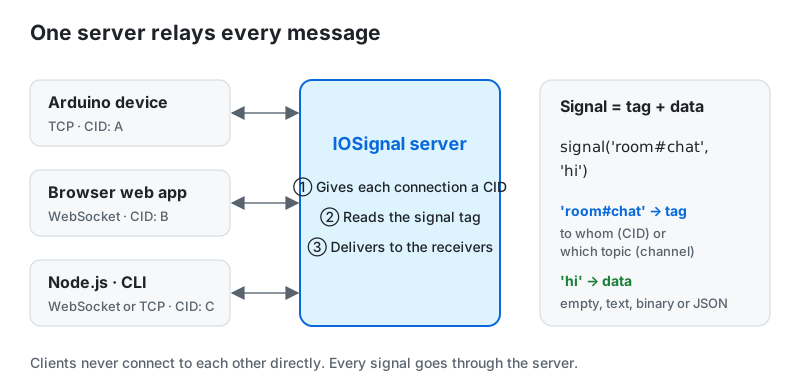
- Clients connect only to the server, never to each other.
- One message is a signal. A signal is a tag (a CID or a channel) plus data.
- The server does not interpret the data. It reads only the tag to find the receivers.
2. Four terms
| Term | Meaning |
|---|---|
| CID | The client ID the server gives each connection. It is fixed once the ready event arrives. |
| Tag | A string such as room#chat or A@state that names the receiver or topic |
| Channel | A named room. Every subscriber receives what is sent to it. |
| Subscription | Telling the server "send me signals with this tag" |
3. Reading a tag
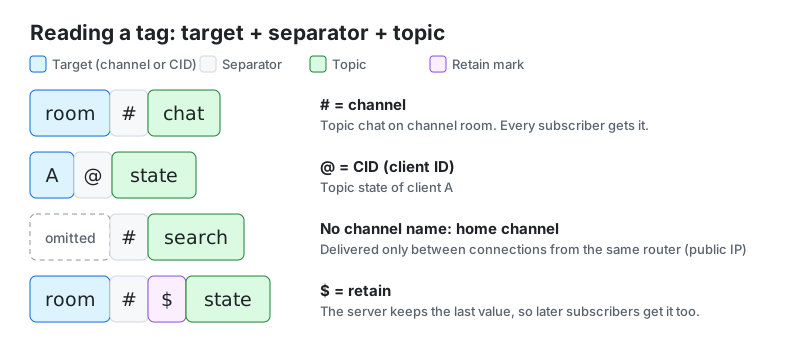
- Before
#is a channel; before@is a CID. - With nothing before
#, the tag uses the home channel (section 5). - A
$asks the server to keep the last value, so a client that subscribes later gets it at once. Use it for "current value" data such as device state. - One different character makes a different tag:
#stateand#$stateare not the same.
4. Three ways to deliver
This is the most important part of IOSignal.
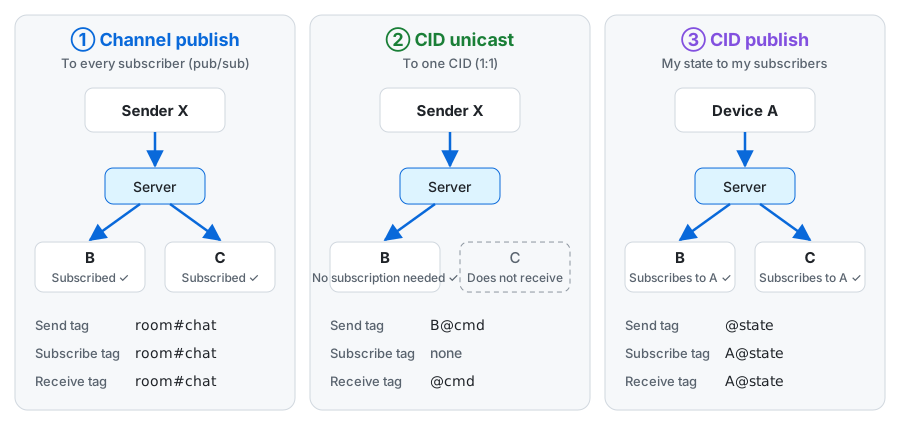
| Way | When | Subscription |
|---|---|---|
| ① Channel publish | Many clients share a topic, as in a chat | Needed |
| ② CID unicast | Commanding one specific device | Not needed |
| ③ CID publish | A device announcing its own state to many apps | Needed |
Tags with @ are the easiest to confuse.
- Sending to
B@cmdreaches only B, which receives it as@cmd(its own CID removed). - Subscribing to
A@statedelivers what A sends as@state. - Sending to a tag that starts with
@, such as@state, means "publish under my CID". The server adds the sending connection's CID, so no other client can send state pretending to be A.
5. Home channel
A tag without a channel name, such as #search, is delivered only between connections from the same router (the same public IP).
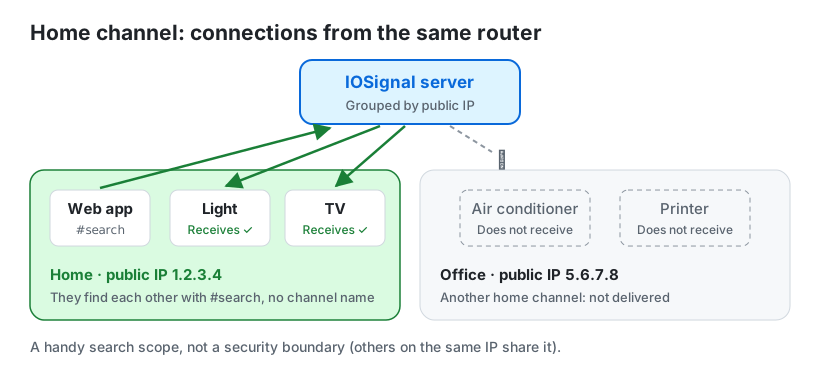
- Devices in one place can find each other without agreeing on a channel name. At home the app sees home devices; at the office it sees office devices.
- It is not a security boundary. Others on the same IP (a café, a VPN) share the home channel. Use authentication for important control.
6. Finding and controlling devices
These are application rules built from the features above. The server does not enforce them; the Remocon web app and the examples follow them together.
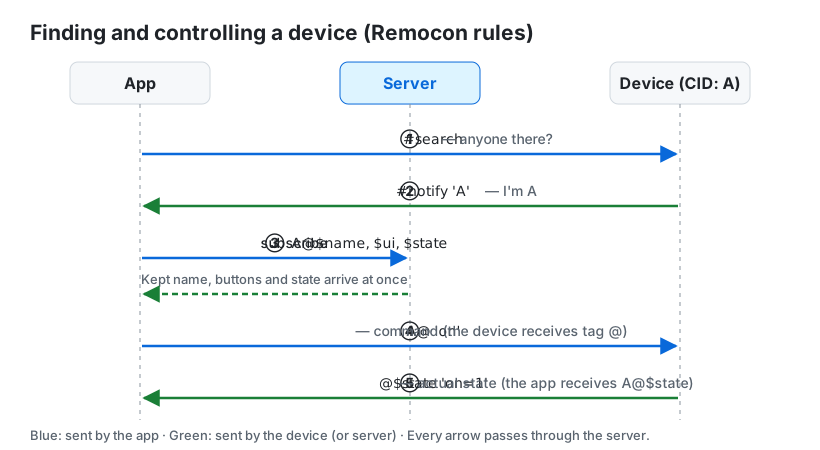
| Step | Feature used |
|---|---|
① App sends #search → ② device answers #notify <cid> | Home channel |
③ Subscribe to name <cid>@$name, buttons <cid>@$ui, state <cid>@$state | CID publish + retain |
④ Command: on to <cid>@ | CID unicast |
⑤ Device sends on=1 on @$state | CID publish + retain |
- Sending a command is not the end. The state the device sends in ⑤ is the actual result. A device sends its state once even for a command it does not know.
- When a device disconnects, the server sends
closeto the subscribers of<cid>@$state. - A name looks like
Living room light:Living room. The part after the first:is the category the app groups devices by; without it the device is uncategorized. - Buttons go in
$uias a comma list such ason,off,toggle. With an official type, sendt=light.1; a screen the device defines itself goes on<cid>@$panel, withp=1added to$ui(t=switch3.1;p=1). - To show several boards as one card, use a group channel. Members answer
#searchwith#notify #channeland share the state#channel$stateinstead of taking commands. - It does not have to be an app. Another Arduino that sends and subscribes with the same tags controls a device the same way.
The full rules are in Build a Remocon device, and a setup with real boards is in Device setup example: relays and button controllers.
7. Authentication and encryption
- An anonymous connection gets a new CID on every reconnection. Sending to an old CID may reach someone else, so find the device again.
- An authenticated connection logs in with a device ID and a secret key and uses the fixed CID registered on the server.
- boho is IOSignal's shared-key authentication and encryption library. Connection encryption stops eavesdroppers, but the server can read the content. To hide it from the server too, use a separate key known only to both ends (E2E).
8. A look at the code
import { IO } from 'iosignal';
const io = new IO('wss://io.iosignal.net/ws');

// Receiver: subscribes automatically on every connection
io.listen('room#chat', (tag, msg) => console.log(tag, msg));
// Sender (another client): send after ready
io.on('ready', () => io.signal('room#chat', 'hi'));
Arduino uses the same tags, but receives everything in one onMessage(tag, type, payload, size) callback and compares tag.
Five things to remember
- Every signal goes through the server, and the server looks only at the tag.
#is a channel,@is a CID,#topicwith nothing before it is the home channel, and$keeps the value.- Sending to
B@xand subscribing toA@xmean different things. - The home channel is a handy search scope, not security.
- The device search and control rules are an agreement between apps and devices, not part of the protocol.